· DeskbookR Team · Product Updates · 2 min read
What's New in DeskbookR - Dashboard Insights for Trends and Savings
The new Dashboard gives administrators a clear view of booking activity, utilization, and request trends so they can make better workplace decisions and identify potential savings.
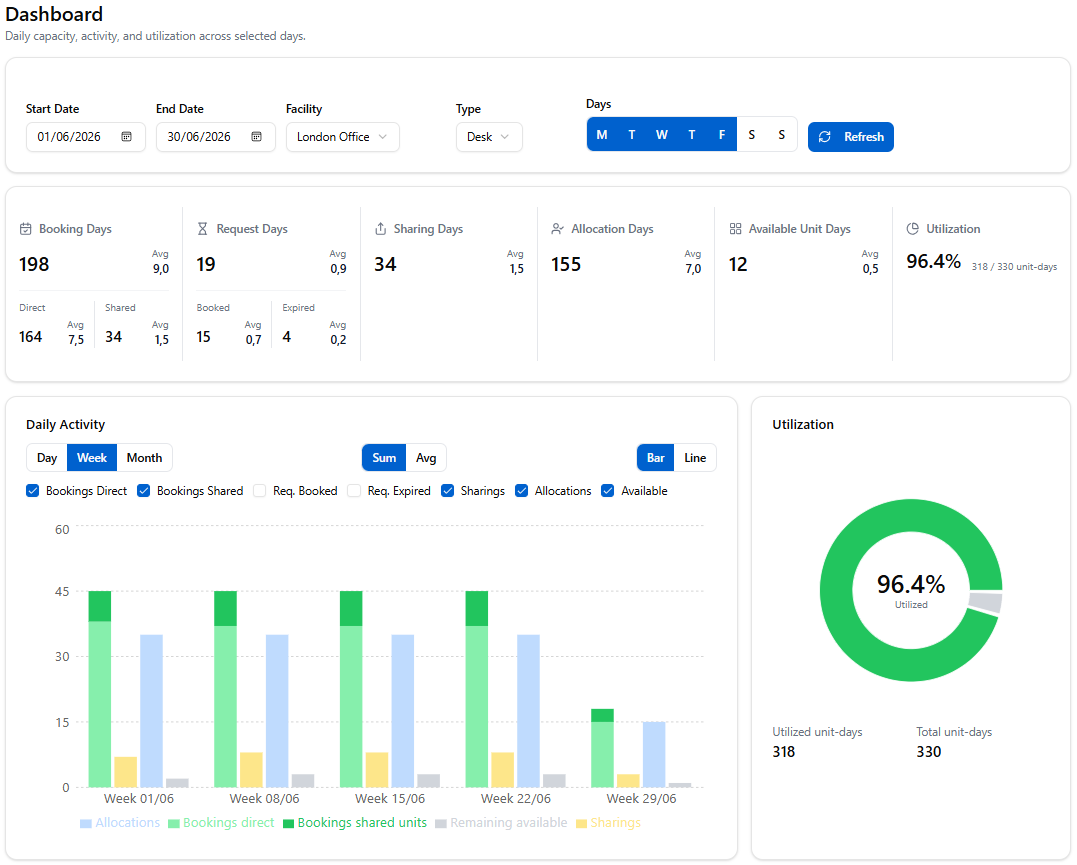
DeskbookR now includes a dedicated Dashboard for administrators, bringing the most important workplace signals into one view. Instead of piecing together booking patterns from separate lists, teams can now see demand, utilization, and activity trends across a selected date range.
Why the Dashboard Matters
Hybrid work creates a moving picture. Mondays can look different from Wednesdays, one facility may be close to capacity while another has room to spare, and desk requests can reveal demand that bookings alone do not show.
The Dashboard helps administrators understand that picture quickly. It turns day-to-day booking data into practical evidence for planning office space, improving availability, and supporting better employee experiences.
See Trends Before They Become Problems
The Dashboard includes filters for date range, facility, unit type, and weekdays. That means admins can compare patterns across time and focus on the exact slice of activity they need to understand.
This is especially useful for spotting:
- Days with consistently high demand.
- Facilities that are underused or nearing capacity.
- Differences between desk and parking usage.
- Request activity that is not converting into confirmed bookings.
- Changes in behavior after policy, allocation, or sharing updates.
When these trends are visible, teams can respond earlier. They can encourage sharing on peak days, adjust allocation rules, add capacity where it is genuinely needed, or reduce unused space with more confidence.
Identify Potential Savings
Office space is one of the largest costs many organizations manage. But savings are difficult to pursue responsibly without reliable utilization data.
The Dashboard gives admins a clearer foundation for those decisions. Low utilization may point to opportunities to consolidate space, reconfigure areas, or rethink the balance between allocated and bookable desks. High utilization with many expired request days may show that demand is being missed, which can help justify targeted capacity increases instead of broad, expensive expansion.
In both cases, the goal is the same: make decisions based on actual workplace behavior, not guesswork.
Better Planning for Hybrid Teams
The Dashboard is designed for regular review. A weekly look at the KPI cards and charts can help admins understand whether the current setup is working, where employees face friction, and how the workplace is changing over time.
For teams using DeskbookR to manage shared desks, allocated units, parking, requests, and desk sharing, this visibility brings the full picture together. It helps leaders move from reactive administration to proactive workplace planning.
The Dashboard is available now for DeskbookR administrators.