The smarter way to manage hybrid workspaces
Book desks and parking spots in seconds, manage allocations, share spaces, and give your admins full visibility over every seat in every building.
Everything you need
Powerful features for every workspace
DeskbookR™ covers the complete lifecycle of office space management — from the moment you assign a unit to the moment you generate utilization reports.
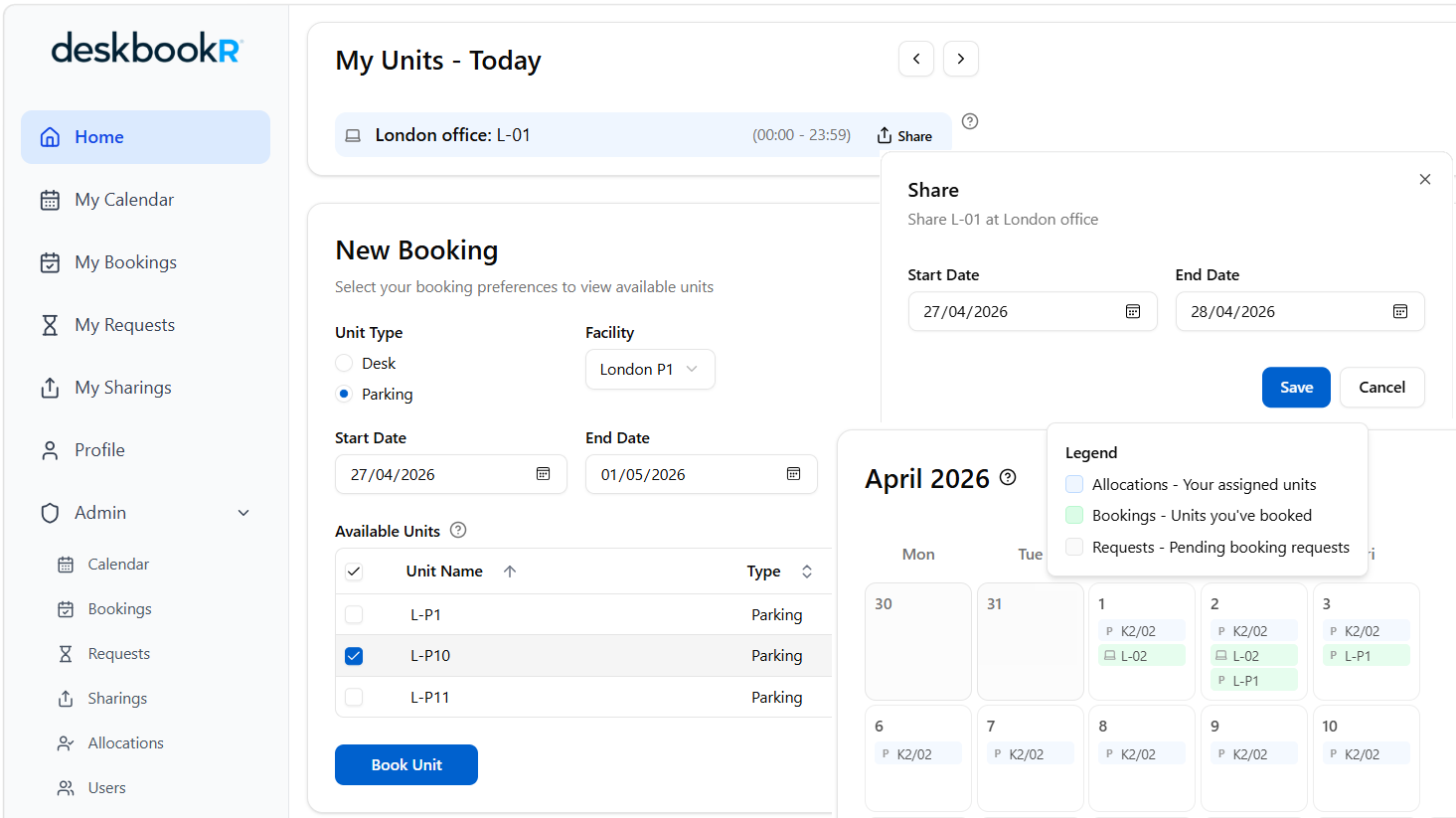
Instant Desk & Parking Booking
Employees book any available desk or parking spot in seconds. Real-time availability ensures zero double-bookings, and flexible date ranges support both daily and recurring reservations.
Permanent Desk Allocations
Assign dedicated desks to employees with optional auto-booking. When auto-booking is on, the system automatically creates daily reservations so assigned users always have their seat waiting.
Desk Sharing
When an allocated employee works remotely, they can share their desk with the team. DeskbookR™ tracks sharing periods and links them to inbound bookings, keeping space utilization high.
Smart Allocation Requests
No desk available? Employees submit requests. Admins process them with FIFO or balanced-distribution algorithms — ensuring fair, transparent assignment across the organization.
Full Admin Dashboard
Manage facilities, units, users, and allocations from a single admin panel. Bulk-import data via CSV, export reports, and configure org-wide policies in minutes.
Organization-wide Calendar
Admins get a bird's-eye view of all bookings, allocations, sharings, and requests across every facility. Filter by user, facility, or date range and spot utilization trends at a glance.
For employees
Book your workspace in seconds
Designed around how people actually work
A clean, intuitive interface means your team starts booking on day one — no training required.Browse real-time availability
See exactly which desks and parking spots are free for your chosen dates — no more email chains or manual spreadsheets.
Book, modify, or cancel anytime
Plans change. DeskbookR™ lets you adjust or cancel reservations instantly, and your calendar always reflects what's current.
Share your desk when working remote
Going to work from home? Make your allocated desk available to teammates for the day with a single click.

For administrators
Run your office with complete confidence
Total visibility. Total control.
From a single user's booking to organization-wide space utilization — every detail is at your fingertips.Manage facilities, floors & units
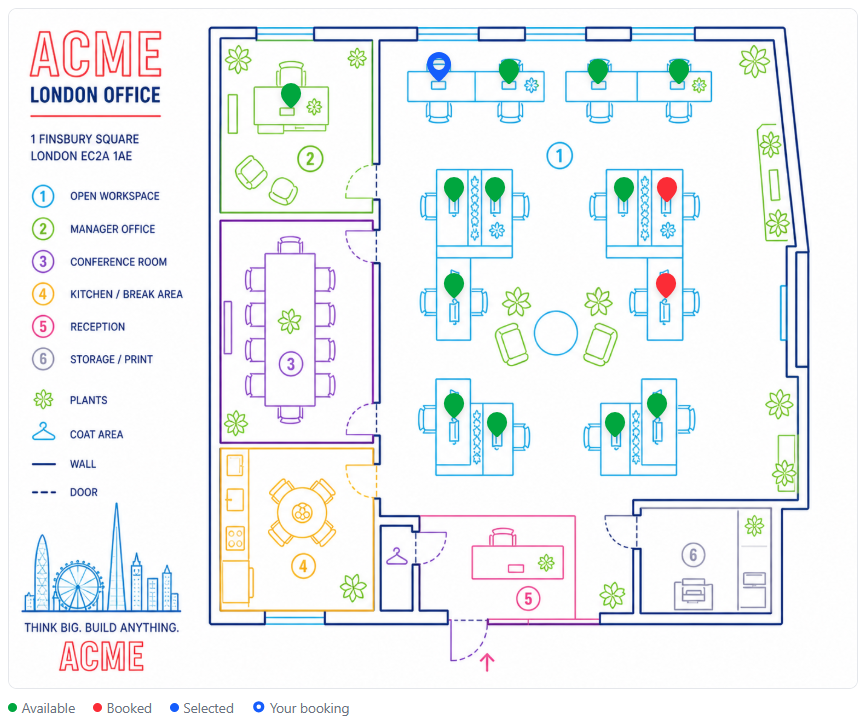
Set up your entire building hierarchy — sites, facilities and individual desk or parking units. Upload floor-plan layouts so users always know exactly where they're sitting.
Control allocations at scale
Assign desks permanently or for fixed periods. Use CSV import to onboard entire departments at once, and export reports for optimization, compliance, or planning purposes.
Configure org-wide booking policies
Set request processing algorithms (FIFO or Balanced), same-day booking cutoff hours, default unit types, and auto-registration domains — all from a single Organization Settings page.
Up and running in three simple steps
Step 1: Set up your organization
Create your organization, define facilities and floors, and add individual desk and parking units. Upload floor-plan images so every employee knows exactly where to sit.
Step 2: Invite your team
Add users individually or import them via CSV. Assign roles (User or Admin), set default facilities, and create permanent allocations for employees with fixed desks.
Step 3: Book, track, and optimize
Employees book desks from the web app or mobile browser. Admins monitor utilization, manage requests and bookings, and continuously optimize how space is used across the organization.

Use cases
Built for every kind of modern workplace
Whether you manage a single-floor startup or a multi-site enterprise, DeskbookR™ adapts to your needs.
Balance remote and in-office days seamlessly. Employees book desks only when they need them, and managers see who's coming in each day.
Manage dozens of buildings, hundreds of floors, and thousands of desks from a single platform with multi-level facility hierarchies.
Offer hot-desking, dedicated memberships, and parking to your members — all tracked and managed from your admin dashboard.
Enforce allocation policies and ensure compliant space management with full booking history and CSV exports.
Give visiting remote employees a frictionless way to book a temporary desk whenever they're in the office — no admin intervention needed.
Manage faculty offices, study rooms, and parking allocations across multiple campuses with fair, algorithm-driven request processing.
FAQs
Frequently asked questions
Have questions about DeskbookR™? We have answers. Can't find what you need? Reach out to our team.
What is the difference between a Booking and an Allocation?
A Booking is a one-time or recurring desk reservation made by an employee. An Allocation is an admin-created, longer-term assignment that reserves a specific desk for a user over a period — with an optional auto-booking feature that automatically creates daily bookings on the user's behalf.
How does desk sharing work?
When an employee has a permanent desk allocation and plans to work remotely, they can "share" their desk for a specific date range. This makes the desk bookable by other team members, maximizing space utilization without any admin intervention.
What request algorithms does DeskbookR™ support?
FIFO (First In, First Out): Requests are processed in the order they arrive — fair and transparent. Balanced: The system considers each user's recent booking history and prioritizes those who have had fewer bookings in the last two weeks, preventing any one person from monopolizing resources.
Can I manage multiple office locations?
Yes. DeskbookR™ supports a full building hierarchy: Organization → Sites → Facilities → Units. You can manage as many buildings and floors as you need, each with its own floor-plan layout image.
Does DeskbookR™ support Microsoft Entra ID (Azure AD) sign-in?
Yes. DeskbookR™ integrates with Microsoft Entra ID for enterprise single sign-on. Employees can authenticate with their existing corporate credentials, and auto-registration by email domain is supported.
How do I migrate existing allocation data?
DeskbookR™ supports CSV import and export for users and allocations. Export your existing spreadsheet data into the DeskbookR™ CSV format and bulk-import in seconds. The system validates every row before importing.
Ready to eliminate desk booking chaos?
Join organizations that have already transformed their hybrid office management with DeskbookR™. No credit card required for your free trial.