Features in depth
Every tool your hybrid office needs
DeskbookR™ isn't just a booking calendar — it's a complete workspace management platform. Here's everything that's included.

Booking
Frictionless desk & parking booking
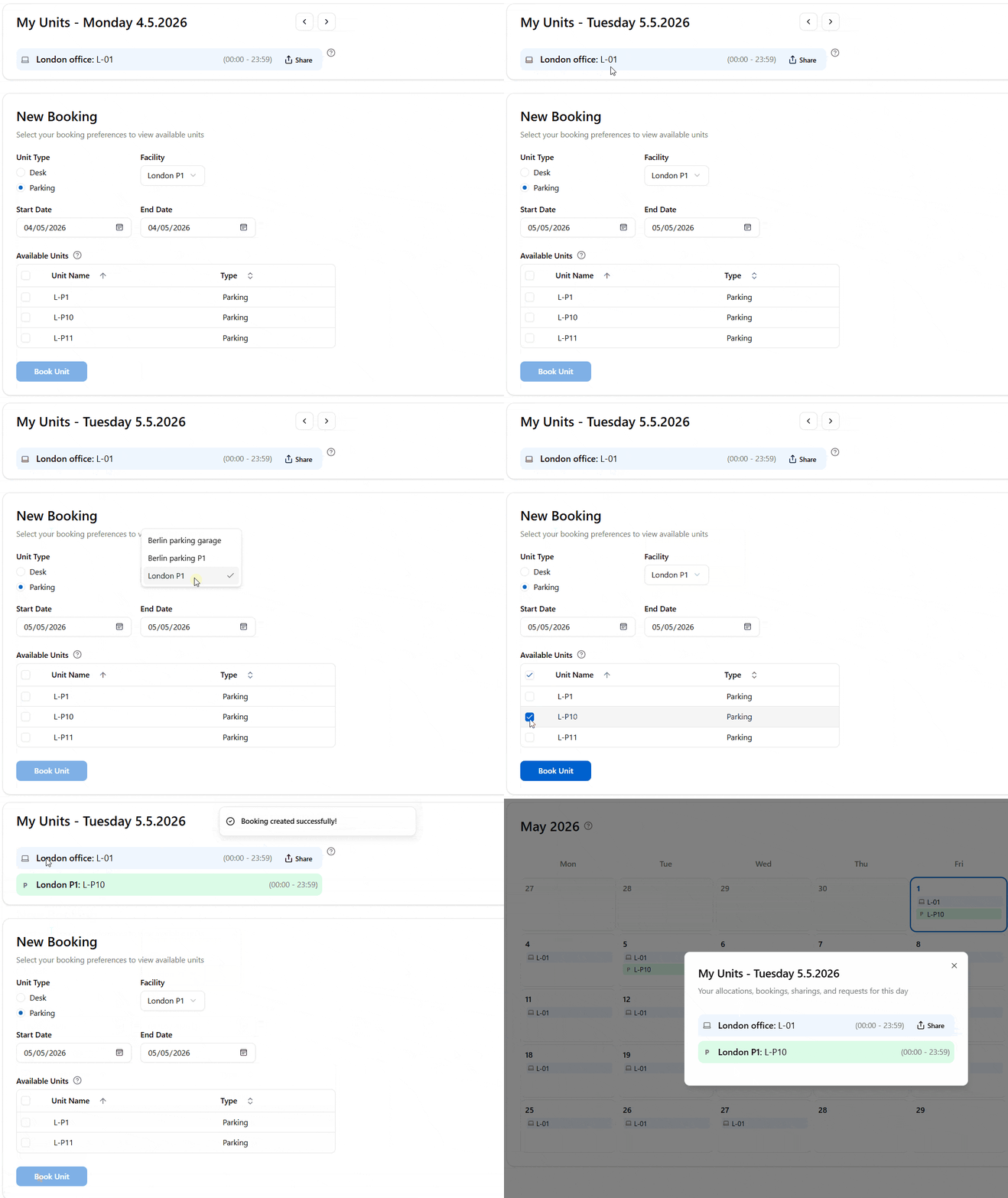
Book in under a minute
Employees go from "I need a desk" to "confirmed" in three taps — no admin intervention required.Real-time availability
See which desks and parking spots are available for any date range, filtered by facility. No stale data, no conflicts.
Day-of and advance booking
Configure a same-day cutoff hour to manage walk-in vs. planned attendance. Employees can also book weeks ahead.
Personal calendar view
Every employee sees their own bookings, allocations, and sharings in a clean monthly calendar — at a glance.
Allocations
Permanent desk assignments with auto-booking
From flexible to fixed — and everything in between
DeskbookR™ handles every allocation model your organization uses.Auto Booking ON — dedicated desks
Assign a specific desk to an employee for a date range. DeskbookR™ automatically creates daily bookings on their behalf — they always have their seat.
Auto Booking OFF — facility access
Grant a user access to any available desk within a facility without pre-reserving a specific unit. Ideal for flexible seating arrangements.
Bulk allocation management
Import allocations from CSV for entire departments. Export existing allocations for auditing or editing in a spreadsheet.

Desk sharing
Maximize space utilization with desk sharing
Turn remote days into reclaimed space
Every empty allocated desk is a wasted asset. DeskbookR™ turns remote days into shared opportunities.Share when working remotely
Employees with a permanent allocation can share their desk when they won't be using it. This instantly makes the desk bookable by teammates.
Sharing linked to bookings
DeskbookR™ tracks which bookings were made against each sharing period. Admins see the full sharing history and who occupied which desk on any given day.
No over-booking, ever
Sharing and booking rules are enforced automatically. A desk can only be shared if an active allocation covers the period — no loopholes.

Dashboard
Turn booking data into workplace insight
Understand demand before it becomes a space problem
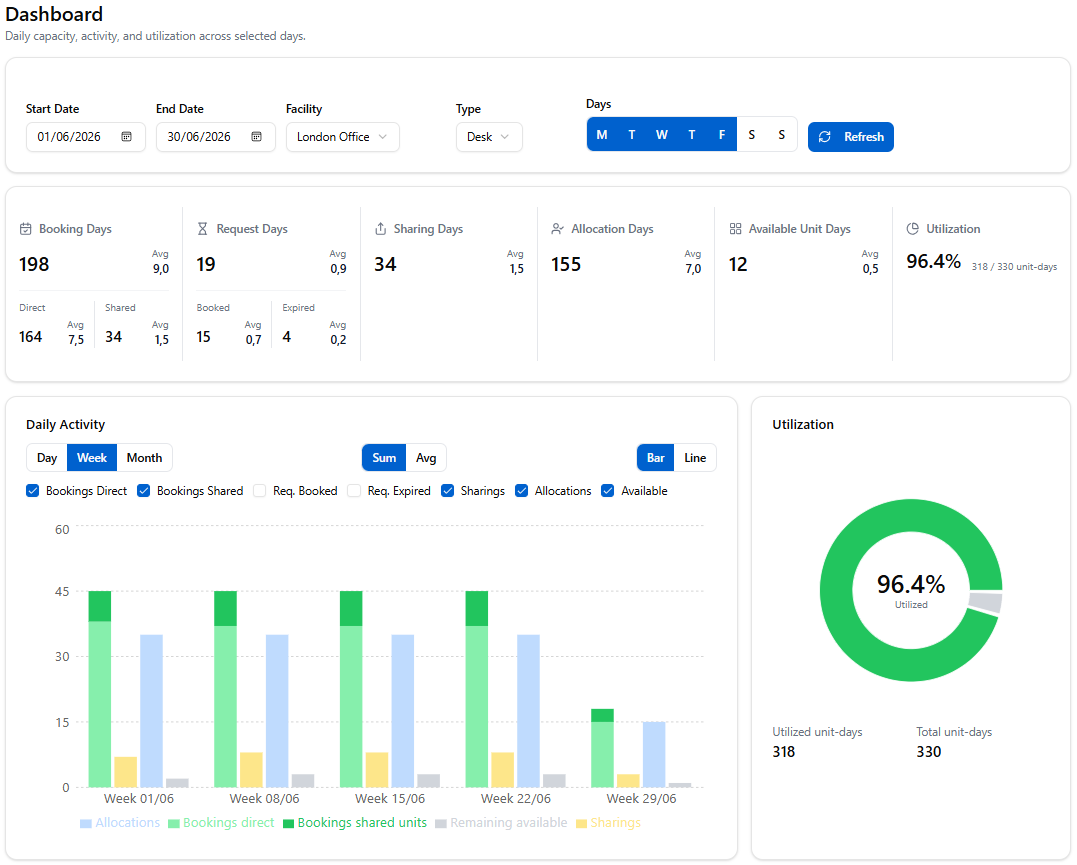
The Dashboard gives administrators a clear view of how desks and parking units are being used, which days are under pressure, and where potential savings may be hiding.Utilization at a glance
See booking activity, request demand, and unit utilization across a selected date range without exporting data first.
Trend-aware planning
Filter by facility, unit type, and weekdays to spot busy days, underused locations, and changing attendance patterns.
Savings opportunities
Use real utilization signals to identify where sharing, reconfiguration, or consolidation could reduce wasted space.
Admin tools
Everything an office manager needs
DeskbookR™ gives administrators granular control over every aspect of office space management.
Facility & unit management
Set up a full building hierarchy: Organization → Sites → Facilities → Units. Upload SVG or image floor plans for each facility.
User & role management
Create and manage user accounts. Assign User or Admin roles. Bulk-import from CSV. Set default facility and unit type per user.
Request processing
When no desks are available, users submit requests. Admins process them with FIFO (first come, first served) or Balanced (fair distribution) algorithms.
Dashboard insights
Track KPIs, daily activity, request conversion, and utilization charts to understand trends and plan potential space savings.
Organization-wide calendar
View all bookings, allocations, sharings, and requests across every facility in a filterable calendar. Identify utilization trends and gaps.
CSV import & export
Bulk-import users and allocations. Export any dataset for reporting, auditing, or editing in Excel. Validation prevents bad data from entering the system.
Organization settings
Configure booking policies, request algorithms, same-day cutoff hours, default unit types, and auto-registration email domains from a single settings page.
Enterprise-ready
Integrations & authentication
Enable single sign-on for your organization. Employees authenticate with their existing Microsoft credentials — no separate password to remember.
Built-in email/password authentication with secure JWT tokens. Full user account management for organizations without SSO.
Allow employees to self-register using their corporate email domain. New accounts are automatically associated with the correct organization.
A full-featured OpenAPI/Swagger REST API lets you integrate DeskbookR™ with your existing tools, HR systems, or custom workflows.
Floor-plan layout images are stored securely in Azure Blob Storage. Supported formats: PNG, JPG, JPEG, SVG, GIF.
Every organization is a separate tenant. Data isolation is enforced at the database access layer — your data is never accessible by other customers.
Ready to see DeskbookR™ in action?
Start a free 14-day trial and experience every feature listed here — no credit card required.